SonicMetro: An Audible Subway Map Powered by WebChucK
Gyehun Go
Background
Even today, countless trains on the Seoul metropolitan subway carry people to their destinations along the tracks. And they repeat the cycle of stopping at designated stations at designated times (probably…) according to the timetable and departing again. There are currently 24 such lines where trains run in the Seoul metropolitan area, and hundreds of trains move on them in their own orderly patterns. However, there are too many trains and stations to see that pattern at a glance, and the subway map is too complex to grasp it all. So, what if we could listen to this pattern instead of just seeing it?
My project SonicMetro started from this idea. What if sound was generated every time a train stopped at a station, and those sounds came together? It might sound like noise at first, but since there is a beautiful pattern in the movement of trains, those noise-like sounds might come together to create beautiful music. The music created in this way will convey the beautiful patterns created by the trains through a different sense.
How It Works
Train Schedule
Using the Seoul Metro Train Schedule Status API provided by Seoul, all recorded weekday/weekend timetables were collected and converted into data. Based on this, the operation schedule of each train was separated and used as the base data for the timetable simulation.
Metro Map
The coordinates of each station were extracted from the Metropolitan Subway Map Korean (KOR) version provided by Seoul Metro, and each station was connected with straight lines using vector graphics. Since all stations are connected by straight lines, the shape of the vector graphics may differ from the actual subway map in some sections with curves or bends.
Sound Production
All sounds produced when a train stops at a station are implemented with WebChucK. WebChucK is a programming language that ports ChucK code to JavaScript, allowing you to freely synthesize and play desired sounds.
How To Use
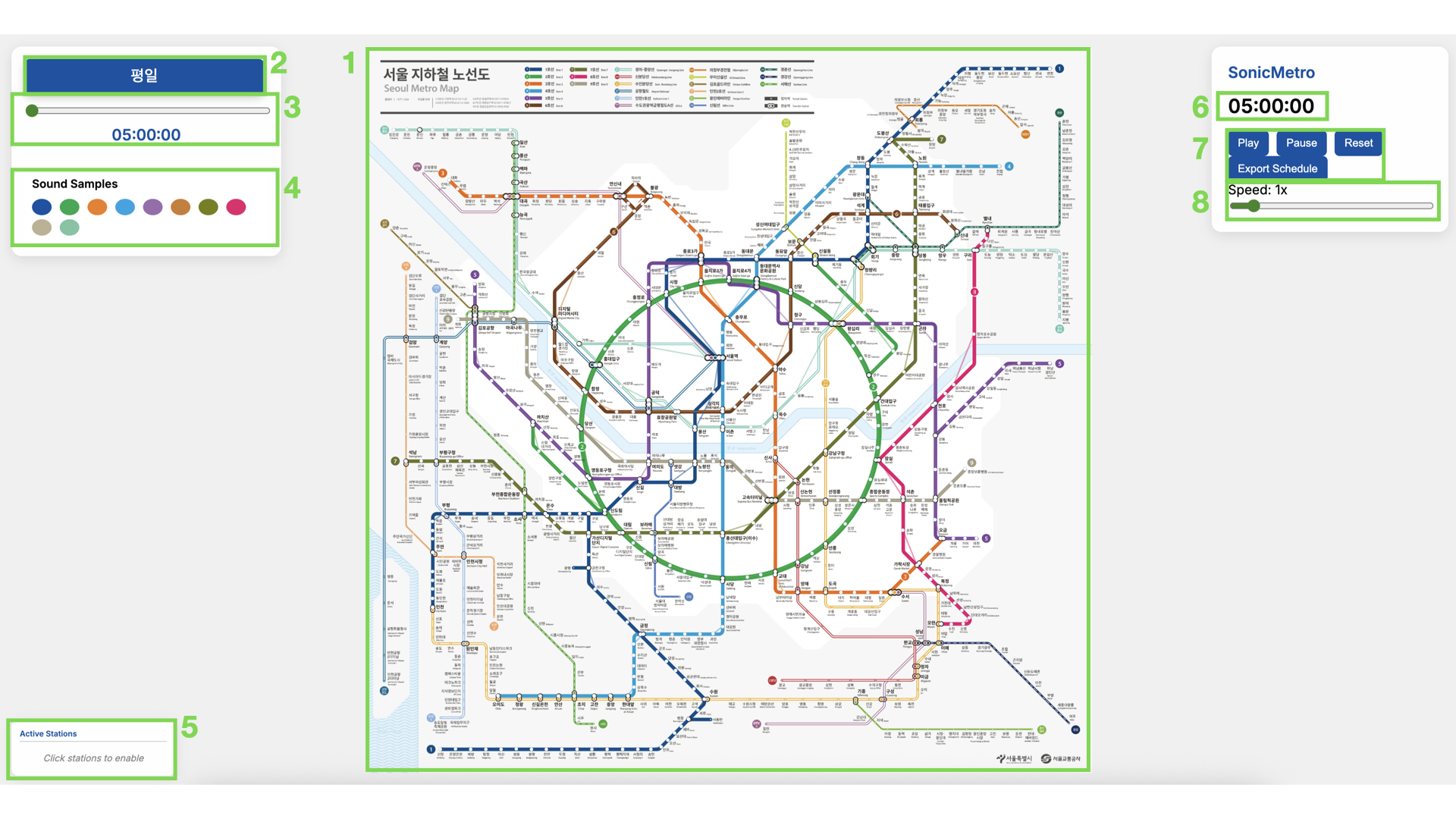
- This is the main subway map screen. The stations that trains will pass through and the paths between stations are implemented as vector graphics on top of the official map provided by Seoul Metro.
- If you click on a white circle on a station, it becomes a large yellow circle. This means the station is enabled. When a train stops at an enabled station, a sound corresponding to that train’s line is played. Different lines play sounds with different base pitches and timbres.
- If you click on an enabled station again, the large yellow circle becomes a small white circle again, and the station is disabled.
- For transfer stations, all positions on all lines are enabled/disabled simultaneously.
- If you click on the line connecting stations, you can disable/enable that line. Trains on a disabled line and the line itself are displayed in gray, and no sound is played even if they stop at an enabled station.
- When a single train passes through consecutive stations on the same line, the pitch gradually rises or falls. For upward/inner circle directions, the pitch rises by one step, and for downward/outer circle directions, it falls by one step. This allows for various pitches to be played even on the same line. The rise and fall occur up to a maximum of one octave, and if it passes through subsequent stations beyond that, it rises/falls from the initial pitch again.
- Click this button to switch the timetable between Weekday(평일) and Weekend(주말). Clicking it resets the simulation time, but enabled stations are not reset.
- Move the slider to jump to any time between the first train’s departure and the last train’s arrival.
- Clicking buttons that match the color of each line will play that line’s unique sound once. You can use these buttons to preview the sound of each line.
- This panel displays a list of currently enabled stations by line. If a line is disabled, the line name and symbol in this panel are also displayed in gray.
- This webpage simulates the time from the earliest departure of all first trains to the latest arrival of all last trains in a day. You can check the currently simulated time through this timer.
- Buttons to control the simulation.
- Play: Plays the simulation. When playing for the first time, it may take some time for WebChucK to load.
- Pause: Pauses the simulation.
- Reset: Resets the simulation time and all enabled stations.
- Export: A button to download a .json file containing timetables for all trains.
- A slider to control the speed of the simulation. It can be adjusted between 0.1x - 10x, and at the default speed of 1x, 1 minute in the simulation is played during 1 real-world second.
Future Direction
Currently, SonicMetro has implemented a total of 10 lines: 1-9호선 and 경의중앙선. This project will continue to be updated until all Seoul metropolitan subway lines are implemented, and the official version will be released when all lines are implemented.
In addition, I plan to supplement and add the following:
- currently, there is a bug where express trains on all lines except Line 9 stop at every station. I plan to correct the timetables for express trains in the future.
- There is a bug where trains rotate rapidly to point to the next direction when stopping at some stations. I plan to fix the station stop animation to be more natural.
- I plan to add a function to customize the sounds assigned to each line.
If you find any bugs or points for improvement while using this project, please feel free to report them to rotation@kaist.ac.kr!